Firmware Architecture
Kamoji's firmware is built on ESPHome, with the device-specific behaviour implemented as a set of custom ESPHome components rather than one monolithic sketch. Each component owns one piece of behaviour and is composed together in the top-level YAML configuration.
These custom components are open source, developed and highly optimized specifically for Kamoji hardware — browse the source at kamoji-esphome.
Custom components
| Component | Responsibility |
|---|---|
kamoji_dynamic_eyes | Handles animated eyes movement reacting to vehicle motion |
kamoji_gif_player | Custom high performance GIF player fully optmized for Kamoji's hardware. This player is able to achieve over 40fps majority of the time. |
kamoji_imu_auto | Motion sensing logics (gyro/accelerometer) — see Motion sensing & G-force below |
kamoji_gforce | Real-time G-force calculation — see Motion sensing & G-force below |
kamoji_flip_fluid | Water simulation with gravity, inspired by this cool project |
kamoji_metaballs | Draws the flowing, blob-like ferrofluid visual effect on screen, reacting live to sound — referenced from this metaball simulation project, combined with FFT audio analysis and the look of a real ferrofluid visualizer |
kamoji_wav_player | Custom WAV player for sound effects with event callbacks and volume control |
kamoji_i2s_mic | Handles digital microphone input from I2S interface |
kamoji_fft_audio_processor | Peforms Fast Fourier Transform (FFT) on raw microphone signal to separate sound into different frequency bands to analyze its characteristics |
kamoji_drive_stats | Driving statistics tracking, to be used by future updates |
kamoji_elm327_ble | [Optional] Simple OBD/ELM327 car-data integration over Bluetooth |
kamoji_espnow | Peer-to-peer communication between Kamojis |
kamoji_webserver_ws | Powers the web page that let you configure Kamoji's WiFi and other settings |
kamoji_ota_wifi | Handles over-the-air (OTA) firmware updates |
kamoji_ota_storage | Handles updating of images & sound assets over-the-air |
kamoji_app_manager | Runs Kamoji Mini Apps: finds them on storage, adds them as modes and runs the one on screen in a sandboxed Lua engine — see Kamoji Mini Apps below |
kamoji_littlefs_file_manager | Custom LittleFS file manager for on-device storage, so the web portal can list, download, and delete them |
kamoji_setting_menu | On-device Settings screen |
kamoji_ui_navigation | Menu/navigation & state machine |
kamoji_power_detect | Power state detection for Kamoji R8 and above |
kamoji_pi_comm | Communication with purpose-built factory test/debug hardwares |
wifi | Custom driver for Wi-Fi, Bluetooth & BLE to work together; includes the captive portal upon connected |
Motion sensing & G-force
kamoji_imu_auto turns the raw gyroscope and accelerometer readings into
the "G-force" value shown on the G-Force radar (kamoji_gforce). The
pipeline is:
- Pre-filter — raw accelerometer/gyroscope readings pass through a sliding-window moving average to smooth out sensor noise.
- Orientation fusion — pitch and roll are estimated with a complementary filter, not a Kalman filter: gyroscope readings are integrated over time, and continuously corrected against the accelerometer's own pitch/roll estimate. By default the fusion trusts the gyro 96% and the accelerometer 4%, but it automatically shifts to a faster 70/30 blend when the car is roughly stationary and the two estimates have drifted apart, so orientation "snaps back" quickly instead of drifting.
- Gravity compensation — using that estimated orientation, the firmware calculates and subtracts the gravity component from the raw acceleration, leaving just the car's actual acceleration/deceleration and cornering forces — the G-force.
- Post-smoothing — the compensated G-force is smoothed once more with an exponential moving average (EMA) before it reaches the G-Force radar and the Ferrofluid/cup-tilt features, so the display doesn't jitter.
A complementary filter was chosen over a Kalman filter here as a simpler, cheaper way to fuse the two sensors that's plenty accurate for a dashboard G-force display — it doesn't need a full statistical motion model.
Performance design
The custom components are built specifically for the ESP32-S3 paired with 8MB of PSRAM, and a few architectural choices come out of that:
- PSRAM for buffers — the large static and dynamic buffers these components need (frame buffers, audio buffers, visualizer lookup tables) are deliberately allocated in PSRAM rather than internal SRAM, keeping SRAM free for the OS, network stack, and other real-time work.
- PSRAM DMA — the ESP32-S3 can DMA directly out of PSRAM, which cuts CPU overhead when pushing frame buffers to the display or reading audio data.
- MIPI over SPI — on displays that support it, the MIPI driver gives higher bandwidth and lower latency than standard SPI, for smoother animation.
- Split across both cores — UI rendering and heavy visual processing
(LVGL,
kamoji_metaballs) are kept on one core, while system and networking tasks (Wi-Fi,kamoji_fft_audio_processor) run on the other, so audio and network activity never stutters the display.
One trade-off worth knowing: kamoji_gif_player bypasses LVGL's rendering
pipeline entirely so full-screen GIFs can hit roughly 40 FPS, but the two
share the same display hardware and can't render to it at the same time.
LVGL is paused for the duration of a GIF and resumed once it finishes.
Configuration files
Kamoji's ESPHome YAML configuration is split by purpose rather than kept in one file:
kamoji-core.yaml— shared configuration included by every build (base ESPHome setup, common components)- Hardware-variant files — one YAML per board revision
(
kamoji-r7-production.yaml,kamoji-r8-production.yaml), which pull inkamoji-core.yamland layer on revision-specific pin mappings. R7 (Founders Edition) and R8 are the only publicly relevant revisions. - Partition table —
partition-kamoji-littlefs.csvdefines flash layout for storage (assets, OTA slots, settings) — see Partitioning below.
This configuration is only compilable with ESPHome 2026.3.x. Later ESPHome versions throw syntax errors on it — the YAML hasn't been updated for syntax changes in newer ESPHome releases yet. Upgrading the configuration to compile on current ESPHome is in progress.
Partitioning
Kamoji uses a custom ESP32 partition table (partition-kamoji-littlefs.csv)
on a 16MB flash chip, laid out for dual-bank OTA plus on-device asset
storage:
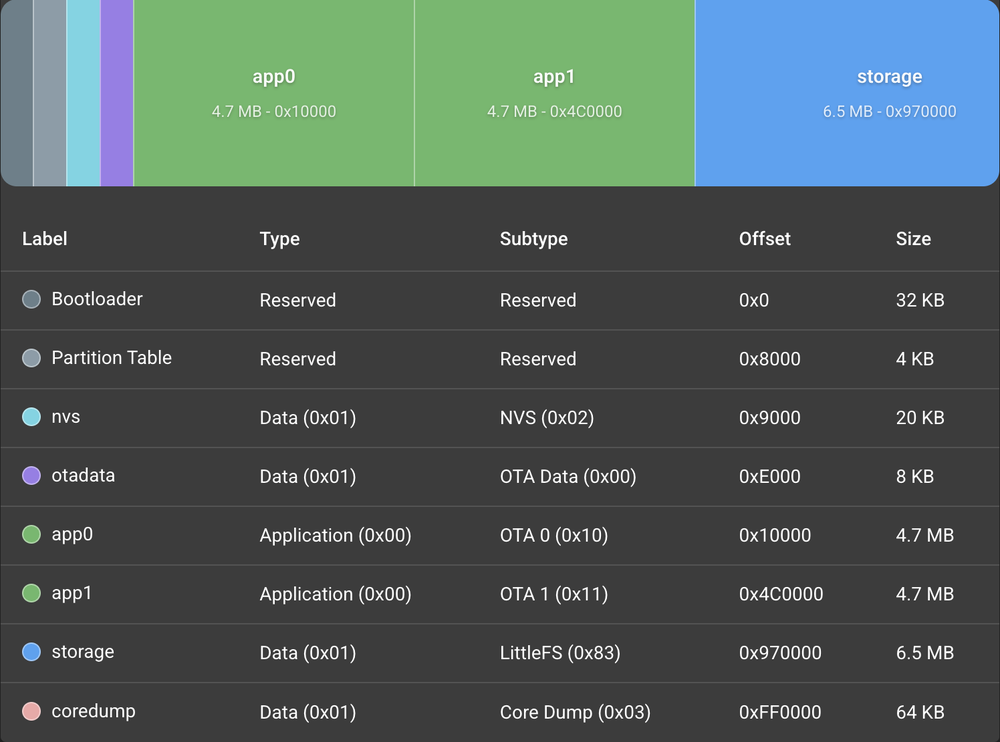
| Partition | Type | Size | Role |
|---|---|---|---|
nvs | data (nvs) | 20 KB | Non-volatile key-value storage — Wi-Fi credentials and device settings |
otadata | data (ota) | 8 KB | Tracks which app slot (app0/app1) is currently active |
app0 | app (ota_0) | ~4.69 MB | First OTA application slot |
app1 | app (ota_1) | ~4.69 MB | Second OTA application slot |
storage | data (littlefs) | 6.5 MB | LittleFS filesystem — GIF animations, sound files, and other on-device assets |
coredump | data (coredump) | 64 KB | Crash diagnostics, written on a firmware crash for post-mortem debugging |
The two app partitions are what makes OTA updates safe: a new firmware
image is written to whichever slot isn't currently running, and otadata
only flips over to it after a successful write. A failed or interrupted
update leaves the previous, still-working firmware in place rather than
bricking the device.
Black Box storage
The Black Box records Kamoji's motion sensor continuously (25 samples a second, with 100 Hz bursts around sharp events) and keeps roughly the last hour. Flash memory wears with every erase, so writing each sample as it arrives would be the worst way to store a continuous recording. Instead, the firmware keeps the recording in memory and writes it out rarely, in large pieces. Its own stated reasons are surviving power cuts and keeping writes away from driving, and the same design keeps flash writes few:
- Buffered in PSRAM — samples collect in a 384 KB PSRAM buffer, not on flash. Each sample is delta-encoded (one byte per value when it changes little from the last one), so an hour of continuous recording comes to under about 1 MB, plus the bursts.
- Written when the car stops — the buffer goes to the
storageLittleFS partition once the car has been near-stationary for 3 seconds, which keeps flash writes away from driving. A stop is also when an R7, which has no battery, may be switched off at any moment, so saving then loses the least. The buffer is written anyway once it holds 256 KB or its oldest data is 10 minutes old, so a power cut normally takes at most that much. - Few, whole-file writes — each write creates one new, immutable chunk file (written to a temporary file and renamed into place), rather than appending to a growing file. That works out to at most about six writes an hour on a long drive without stops, plus one per stop. A buffer holding only event markers waits for the next recorded second rather than costing a write of its own, and nothing is recorded continuously while Kamoji sits still for more than a minute.
- Out of the way of updates — writes wait while an asset sync, upload or OTA update is using the storage.
- Bounded on flash — the oldest chunks are deleted until all of them hold at most an hour of recording and about 1.1 MB, with at least 512 KB of the partition left free. From firmware 0.1.74, an asset update that needs the room deletes the oldest chunks first.
The trip number that labels each recording lives in NVS and costs one small write per boot. Below all of this, LittleFS spreads erases across the partition with its own built-in wear levelling.
Audio recording
Kamoji's microphone runs all the time for its sound-reactive features, and the app can also ask it to record a short clip of the cabin's sound, used to tune how those features filter out background noise.
- One signal path —
kamoji_i2s_micreads the I2S microphone on its own task on core 0 (the Wi-Fi core), 16 kHz mono. Each block is aligned, has its DC offset removed and gets a software gain, measured automatically at boot by default. A recording takes exactly those samples, before they go on tokamoji_fft_audio_processor, so a clip is what the visualizers hear, and recording does not interrupt them. - Memory only — a clip of up to 30 seconds is recorded into a single PSRAM buffer (32-bit samples, about 1.9 MB at the maximum) and is never written to flash. Recording stops by itself when the buffer is full. The clip stays in memory until the next recording or a restart.
- Record, then download — the clip goes to the phone afterwards, as a WAV file over Wi-Fi, not streamed live. The app stays off Wi-Fi while Kamoji listens, because radio traffic would colour the noise being measured.
- Only on request — Kamoji never records on its own. From firmware 0.1.75, a recording can only be started, checked and downloaded with a key that a trusted phone gets over Bluetooth (each new key replaces the last), and only during a short window after that phone's Wi-Fi handshake. See Audio recording.
- Shared with playback — the recorder does not pause Kamoji's own sounds, so a clip taken while one plays includes it.
Kamoji Mini Apps
Kamoji Mini Apps add modes to Kamoji without changing its
firmware. The firmware stays exactly as published; a mini app is a folder of
files that kamoji_app_manager reads at runtime.
Where they are stored
Mini apps live on the storage LittleFS partition (see
Partitioning), next to Kamoji's own animations and sounds, one
folder per app:
/storage/
├── boot_logo.gif, kamoji.wav, …     Kamoji's own assets (top level)
├── bbox/                            Black Box chunks
└── apps/
    ├── clock/                       one folder per mini app, named after its id
    ├── excite-o-meter/
    └── .staging/                    installs in progress (see below)
Because the partition table can't change with a firmware update, mini apps
share the 6.5 MB partition with the assets and the Black Box. The asset
updates and the Black Box only touch their own files, never anything under
apps/.
Sample app folder
apps/clock/
├── manifest.json     id, name, version, author, api_version, permissions, settings ("params"), data sources
├── layout.json       the widgets on screen, with {{ }} expressions bound to live values
├── main.lua          optional script: helper functions and handlers (on_top_tap, on_bump, on_mqtt, …)
├── config.json       the user's settings, written by the Kamoji app (kept across updates)
└── data/             optional, the mini app's own files (kept across updates)
A minimal manifest.json:
{
  "id": "clock",
  "name": "Clock",
  "version": "1.0.0",
  "author": "Originally US",
  "api_version": 1,
  "permissions": ["touch"],
  "params": [
    { "key": "utc_offset", "type": "number", "label": "UTC offset", "default": 8, "min": -12, "max": 14 }
  ]
}
The full reference is in Writing a Kamoji Mini App.
How they run
- Found at boot — once LittleFS is mounted, the manager scans
apps/, reads eachmanifest.jsonand checks it: theidmust match the folder name andapi_versionmust be one this firmware supports. Mini apps that pass are added to the mode list, as modes 6 and up, after the last built-in mode, in order of their id. A mini app that fails is listed (over Bluetooth) with the reason, but never shown. - Only the one on screen runs — swiping into a mini app creates its Lua
state, loads its settings and
main.lua, and builds its widgets on a shared page. Swiping away runson_exit, closes its data connections and frees all of its memory. Nothing of a mini app runs in the background. - Driven by the firmware — 10 times a second the firmware hands the mini app fresh values (motion, light, temperature, time, Excite-O-Meter scores), re-evaluates the widgets' expressions and redraws only the widgets whose value changed. Touches (top tap, top hold, pinch) and driving events (bump, hard braking, hard acceleration, lean) call the mini app's handlers.
- Remembered by id — Kamoji reopens the last mini app on screen after a restart, by its id, even if installing other mini apps changed mode numbers.
Sandbox
Anyone can write and sideload a mini app, so the firmware treats every one as untrusted:
- Lua 5.4 with a reduced library — base functions,
math,string,table,utf8and coroutines only. There is noio,os,packageordebug, andload,loadfile,dofile,require,collectgarbageandstring.dumpare removed. Code is only ever loaded as text, never as precompiled bytecode. - No direct access to the hardware — a mini app sees only the values and
calls the firmware gives it (
imu,drive,time,param,kamoji.play,mqtt.publish, …). It can't touch files, pins, Wi-Fi or Bluetooth, other mini apps, or the built-in modes. - Permissions — network access (MQTT) only works when the manifest asks for
it (
net.mqtt), and the Kamoji app shows a mini app's permissions before it is installed. - Memory cap — each mini app's Lua memory comes from PSRAM through its own allocator and is capped at 512 KB; asking for more fails inside the mini app, not in the firmware.
- CPU budget — a hook counts the instructions Lua executes. Evaluating all
the widgets may take at most 20 ms per tick, and each handler (
main.lua, a touch, an event, a message) at most 200 ms. Going over stops that call with an error, so a runaway loop can't freeze Kamoji. - Errors stay inside — a failing expression shows "—" in its widget and the
mini app carries on. A mini app whose
main.luaor layout fails, or that keeps failing, is stopped and replaced by an error card naming it; the rest of Kamoji keeps running and a swipe leaves it as usual. - Network only while on screen — an MQTT connection opens when the mini app comes on screen and closes when it leaves. Incoming messages are queued (at most 32, 2 KB each) and handed to the mini app on the main loop.
Installing and updating
The Kamoji app installs mini apps over Bluetooth (see
Sideloading for the commands). Each file is checked
against its MD5 and written to apps/.staging/<id>/; only when every file has
arrived does the commit move the folder into place in one rename, so a failed
or cancelled install never leaves a half-written mini app behind. An update
keeps the user's config.json and the mini app's data/ folder. If the mini
app being updated, removed or reconfigured is on screen, it restarts (or Kamoji
returns to its eyes) straight away.